


Radio App
4.6142.00 Reviews
App Specs
- Version
- 1.2.0
- Updated On
- License
- Free
- Downloads
- 100,000+
- Developer
- RAFIKI APPS LLC
- Categories
- Music & Audio
- Platform
- Android
Screenshots
 Analysis by AppCompare
I installed Radio App expecting a straightforward way to move between FM, AM, and internet radio, and that is exactly where it makes its best first impression. Instead of treating radio as a single stream type, it brings traditional broadcasts and online listening into the same general experience. That matters when my listening habits change during the day: local radio can be useful in the car or around town, while online stations are more practical when I want a particular music style, news source, sports coverage, or a station from another place.
This is a free Music & Audio app from RAFIKI APPS LLC, with a Teen content rating. It has reached over 100 thousand installs and holds a 4.5 average from around 1.2 thousand ratings, so it is not an obscure experiment with no audience. My main question was not whether it could play radio, but whether it would still deserve a place on my phone after the initial curiosity wore off. Radio apps often feel useful for a few days and then become clutter, especially when a phone already has music services and a regular browser. Here, the answer depends heavily on how often you listen to live broadcasts rather than on-demand audio.
What the first week feels like
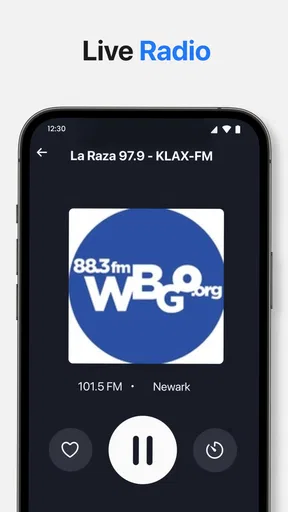
The first week is where the app is most immediately convincing. Live radio has a different rhythm from playlists: I do not have to decide what to play next, and the station itself supplies the sequence, presenters, interruptions, and sense of place. Radio App is aimed at that simple behavior. Its scope includes music, news, sports, and local stations, which gives it more practical range than an app focused only on internet music channels.
I found the FM and AM angle especially relevant for people who still use broadcast radio but do not want separate tools for every listening situation. Online radio, meanwhile, is useful when the local dial is limited or when I want to hear a station outside my immediate area. That combination creates a sensible everyday workflow: use a familiar broadcast source when it is available, then switch to online listening when the content matters more than the signal source.
The app is also easy to understand conceptually. I do not need to build a library, manage albums, or train a recommendation system before hearing something. I choose a station and listen. That low-commitment design is a genuine strength for background listening, especially while cooking, working, commuting, or getting ready in the morning.
One useful habit is to judge a radio app by how quickly it gets me to a station I already trust, not by how many choices it appears to offer. With Radio App, I would spend the first session identifying a small group of dependable stations rather than trying to sample everything. A short personal rotation is less tiring than repeatedly browsing through a large collection, and it gives the app a clearer role on the phone.
The free price makes that trial easy. I can install it without turning the first week into a financial decision, then see whether live radio actually fits my routine. There are in-app purchases ranging from around three dollars to about twenty-five dollars per item, so I would still check any purchase screen carefully before confirming anything. The important point is that the basic decision is low risk: first establish a listening habit, then decide whether any optional spending is worthwhile.
Worth Reading Before You Choose

EA SPORTS FC Mobile 26 Is a Bigger Football Game, but It Takes Time

Flipboard Shows What News Apps Must Do Beyond the Feed

Switching to Android Auto Means Rethinking Your Driving Routine

Google Calendar Makes a Crowded Week Easier to Manage

Ludo King Makes the Most of the Minutes Between Plans

Baby Panda World Brings Quick Play to Modern Phones, but Its Game Library Feels Busy
Where it fits beside familiar alternatives
Compared with a music streaming service, this app is better when I want a live program, a presenter, a sports broadcast, or the feeling of joining something already in progress. A streaming service is normally stronger for exact song selection, offline libraries, albums, and uninterrupted personal playlists. If I know precisely what I want to hear, Radio App is not the more efficient tool.
Compared with opening a station website in a browser, a dedicated app is more natural for repeated listening. I do not have to search for the same station each time, and the experience is centered on audio rather than a web page. That said, a browser can still be preferable when I only need a single station occasionally or when I want to read the station’s accompanying articles and schedules.
It also differs from a podcast app. Podcasts give me control over timing and episodes, while live radio gives me immediacy and unpredictability. I would not replace a podcast manager with this app, but I can see using both: podcasts for planned listening and live radio when I want company without choosing a specific program.
Three practical habits that improve the experience
My first recommendation is to separate “discovery” from “daily listening.” During the first few sessions, explore music, news, sports, and local options. After that, keep a compact set of regular choices. This avoids a common radio-app problem in which browsing becomes the main activity and listening becomes secondary.
Second, use the source type deliberately. FM and AM are the sensible choices when I want local immediacy or when online connectivity is inconvenient. Online stations are more attractive for variety and distance. Treating those as different tools within one app makes switching feel purposeful instead of random.
Third, choose stations according to the task rather than the genre alone. A talk-heavy news station may suit a short morning update, while music is less distracting during repetitive work. Sports coverage can be valuable when I want live context rather than a later summary. This sounds obvious, but it is the difference between an app that becomes part of a routine and one that is opened only when I am bored.
Whether it earns month-to-month space
After the novelty fades, the app’s lasting value comes from repetition. Radio is naturally habit-friendly because it can fill the same moments every day without demanding much attention. If I listen during breakfast, a commute, household chores, or an evening walk, a live-radio app can become as automatic as checking the weather.
Radio App is strongest for people who want variety without constant control. I can start a broadcast and let the station decide the order, which reduces the small but real fatigue of choosing songs. This is particularly useful when I am busy or when I want audio in the background rather than a carefully curated soundtrack.
The app also has a reasonable role for local awareness. Local stations can reflect traffic, regional news, weather, community discussion, and sports in a way that a global music service usually does not. Even if I use a streaming subscription most of the time, live local radio can provide a different kind of usefulness. The value is not just audio quality; it is connection to what is happening around me.
For someone who listens only to downloaded music, however, the long-term case is weaker. This app is not the obvious choice for offline albums, personal collections, or precise replay. Likewise, listeners who dislike presenters, advertising, scheduled programming, or interruptions may find live radio less satisfying than on-demand services. The free installation does not change that basic mismatch.
The version I reviewed is 1.1.2, and it runs on Android 6.0 or later. That broad operating-system reach is helpful for people using older Android phones, particularly as a secondary device or a dedicated kitchen, car, or bedside phone. At the same time, older hardware and older system software can make any audio app feel less comfortable than it does on a newer phone, so I would keep expectations realistic if the device is already struggling with other applications.
Who gets the most recurring value
I would recommend it most readily to someone who answers yes to several of these situations:
You regularly listen to live music, news, sports, or local broadcasts.
You want one radio-focused place for FM, AM, and online listening.
You enjoy letting a station choose the next item instead of managing a queue.
You need background audio for repeated daily activities.
It is less suitable for a listener who wants uninterrupted music, exact track selection, offline playback, or a carefully organized personal library. In those cases, a conventional streaming service or a podcast app will probably remain the better long-term tool. I would also skip it if I only listen to one station once in a while; a browser shortcut may be enough and would avoid adding another app to maintain.
A realistic daily scenario
Imagine a weekday in which I want a quick local update while making breakfast, music during a commute, and sports coverage later in the day. Radio App can occupy all three moments without requiring three separate listening systems. I might begin with a local broadcast, move to an online music station when I leave the house, and return to a relevant sports station when the event begins. The value here is not that every transition is revolutionary; it is that the app follows the shape of a radio listener’s day.
In that scenario, I would not leave the app open and constantly browse. I would decide in advance which type of broadcast fits each part of the day, then start listening and put the phone away. That approach also reduces battery and attention concerns compared with repeatedly checking the screen. Radio works best when it becomes ambient, and this app benefits from being treated as a background companion rather than a visual destination.
Maintenance, friction, and sources of fatigue
The maintenance burden is fairly low in concept, but live audio always carries practical dependencies. Stations can change schedules, online streams can behave differently from broadcast sources, and the usefulness of a station depends on whether its programming still matches what I want. Those are not reasons to reject the app, but they do mean that a favorite station today may not remain a favorite indefinitely.
Another form of maintenance is personal. If I keep too many stations in rotation, choosing becomes tiring. If I never revisit my choices, I may miss better options for news, music, or sports. The best balance is a small, purposeful set that I refresh when my routines change. This is a more important long-term tactic than endlessly searching for new stations.
Live radio can also produce fatigue through repetition. A station may replay familiar material, follow a schedule that does not match my free time, or interrupt music with segments I do not enjoy. On-demand audio lets me remove those irritations; radio asks me to accept them as part of the format. The app can make access easier, but it cannot eliminate the character of live broadcasting.
I would also pay attention to the difference between having many sources and having useful sources. A broad selection sounds attractive, yet a station is only valuable if it starts reliably, suits the moment, and gives me a reason to return. My practical test would be simple: after a couple of weeks, count how often I choose the app without being prompted by curiosity. If the answer is rarely, uninstalling it is sensible even if the first impression was good.
The in-app purchase range is another reason to keep the app’s long-term role clear. Since the application is free to start, I would not spend immediately just to make the experience feel more complete. I would first confirm that it has replaced a real habit, such as opening a browser or switching among several station tools. Optional spending makes more sense only when it solves a recurring annoyance or supports a feature I use regularly; otherwise, the free entry point is enough for evaluation.
Questions I would ask before keeping it
Can it replace my music subscription? In my view, no—not if the main reason I use that subscription is exact control, saved albums, or offline listening. Radio App complements that kind of service better than it replaces it. Its advantage is live programming and variety, not personal catalog management.
Is it useful without a strong local radio scene? It can be, because online listening broadens the range beyond nearby stations. The trade-off is that distant stations may feel less relevant for local information. I would use online sources for music and specialist programming, while relying on local broadcasts when regional context matters.
Will I need to manage it constantly? Not if I keep the station rotation small. The app becomes more demanding when I approach it like a discovery catalog and keep searching every session. A stable routine makes it considerably easier to live with.
Is the free version enough to judge it fairly? Yes, as a starting point. I can decide whether the listening model suits me before considering the optional purchases. I would treat any purchase as a later decision, not as part of installation.
Is it appropriate for younger listeners? The content rating is Teen, so I would use that as a reminder that live broadcasts can vary by station and subject matter. Parents should still consider which stations a young person can access and whether unsupervised listening fits their expectations.
My long-term verdict
Radio App earns lasting space when live listening is already part of your life, not merely something you want to sample once. Its combination of FM, AM, and online radio gives it a clear identity, and the coverage of music, news, sports, and local stations makes it more flexible than a single-purpose stream shortcut. I appreciate that it can serve different parts of the day without asking me to build a library or make a decision about every song.
Its weaknesses are equally tied to that identity. It cannot give the control of on-demand audio, and it cannot make scheduled programming feel personal. Listeners who want silence between tracks, downloaded content, or complete control over what plays next should choose another category of app. Those are not small exceptions; they define whether this product fits.
For me, the deciding factor is habit. If I use it for a morning update, a commute, or regular sports and music listening, it becomes a practical tool rather than a novelty. If I open it only to browse stations and then return to a streaming service, it does not justify the extra space. The free price makes testing easy, the 4.5 average suggests that many users find the approach worthwhile, and RAFIKI APPS LLC has kept the concept focused.
My recommendation is to install it with one concrete routine in mind. Pick a daily listening moment, create a short rotation of stations, and reassess after the curiosity has passed. If the app continues to start naturally during that routine, it has earned its place. If not, a browser shortcut, a music service, or a podcast app may serve you better. That is the honest strength of this release: it is not trying to be everything, but for the right kind of radio listener, its simple live-audio role can remain useful month after month.
Pros
- Wide selection of stations across music
- news
- sports
- and talk radio.
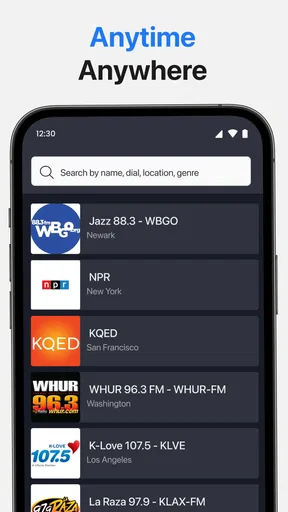
- Simple search makes it easy to find stations by name
- genre
- or location.
- Background playback lets you listen while using other apps.
- Favorites provide quick access to regularly streamed stations.
- Many stations include song or program details during playback.
Cons
- Audio quality depends heavily on the station’s stream and your connection.
- Some stations may be unavailable because of regional broadcasting restrictions.
- Free listening may include frequent ads or promotional interruptions.
- Battery and mobile data usage can increase during extended streaming.
- A few stations may have delays
- buffering
- or occasional connection drops.
FAQs for Radio App
What is Radio App and what can I use it for?
Radio App is a mobile listening platform that lets you discover and stream radio stations from different locations and categories. Depending on the available catalog, you may find music, news, sports, talk shows, podcasts, and local broadcasts. It is designed for convenient listening on Android or iOS, whether you are at home, commuting, or exploring new stations.
Does Radio App require an internet connection to work?
Yes, Radio App generally needs an active internet connection because stations are streamed online in real time. It can work over Wi-Fi or mobile data, but streaming for long periods may consume a considerable amount of data. Before using it on a cellular network, check your data plan and consider Wi-Fi when listening to high-quality audio.
Is Radio App free to download and use?
Radio App may be free to download, although the exact features and business model can vary depending on the version available in your region. Some stations or functions may be accessible without payment, while advertisements, premium subscriptions, or optional purchases may also be included. Review the store listing carefully before downloading or subscribing.
Can I listen to my favorite stations and save them for later?
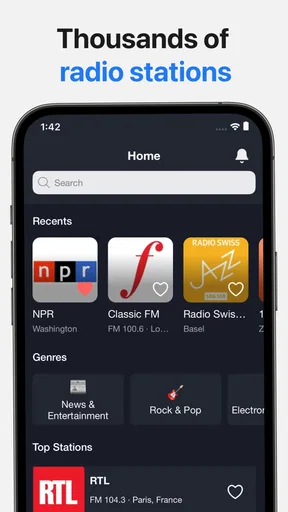
Most radio applications provide a way to search for stations and mark preferred channels for faster access. In Radio App, the available options may include favorites, recently played stations, categories, or a personalized list. Station availability can change because broadcasts depend on third-party providers, regional restrictions, and whether each station remains online.
Does Radio App continue playing when my phone screen is locked?
Radio App is typically intended to support background playback, allowing you to keep listening while using another application or when the screen is locked. However, performance may depend on your device, operating system, battery-saving settings, and the station itself. If playback stops unexpectedly, check background permissions, battery restrictions, and your internet connection.


